Examples · Walkthrough

Every door, drill and check

Follow one school site through a working day and an inspection notice: the day’s checks on a site plan, the weekly alarm test, a fire door that won’t close, a lockdown drill, a contractor’s permit and a pack that builds itself from the records.

ExampleIllustrative workflow · fictional school data

Illustrative only, with fictional data. This shows record-keeping, not security or fire-safety advice. Follow the SIA’s guidance and your own competent advisers.

Interactive walkthrough

How the walkthrough works

Six short chapters follow one school site through a working day and the notice of an inspection. ISI inspects independent schools about every three years, with at most two days’ notice.

Martyn’s Law applies where 200 or more people could reasonably be expected; schools stay in the standard tier, whose duties are to notify the SIA and have procedures for evacuation, invacuation, lockdown and communication.

Guided playback takes about a minute and a half. You can pause at any time, choose a chapter, or take each step yourself.

  1. Before the bell
  2. Weekly alarm test
  3. A fire door that won’t close
  4. Lockdown drill
  5. Contractor on site
  6. Ready at two days’ notice

Prefer to read? The illustrated version tells the same story with stills and the interface details.

ExampleIllustrative workflow · fictional school data

Illustrated version

The same day, in six chapters

Stills from the 3D scene, what happens in each chapter, and what the site manager’s tablet and the site office screen show. It needs no graphics support and works without JavaScript.

ExampleIllustrative workflow · fictional school data. Nothing here is a live system or a real school.

  1. Chapter 01 of 06

    Before the bell

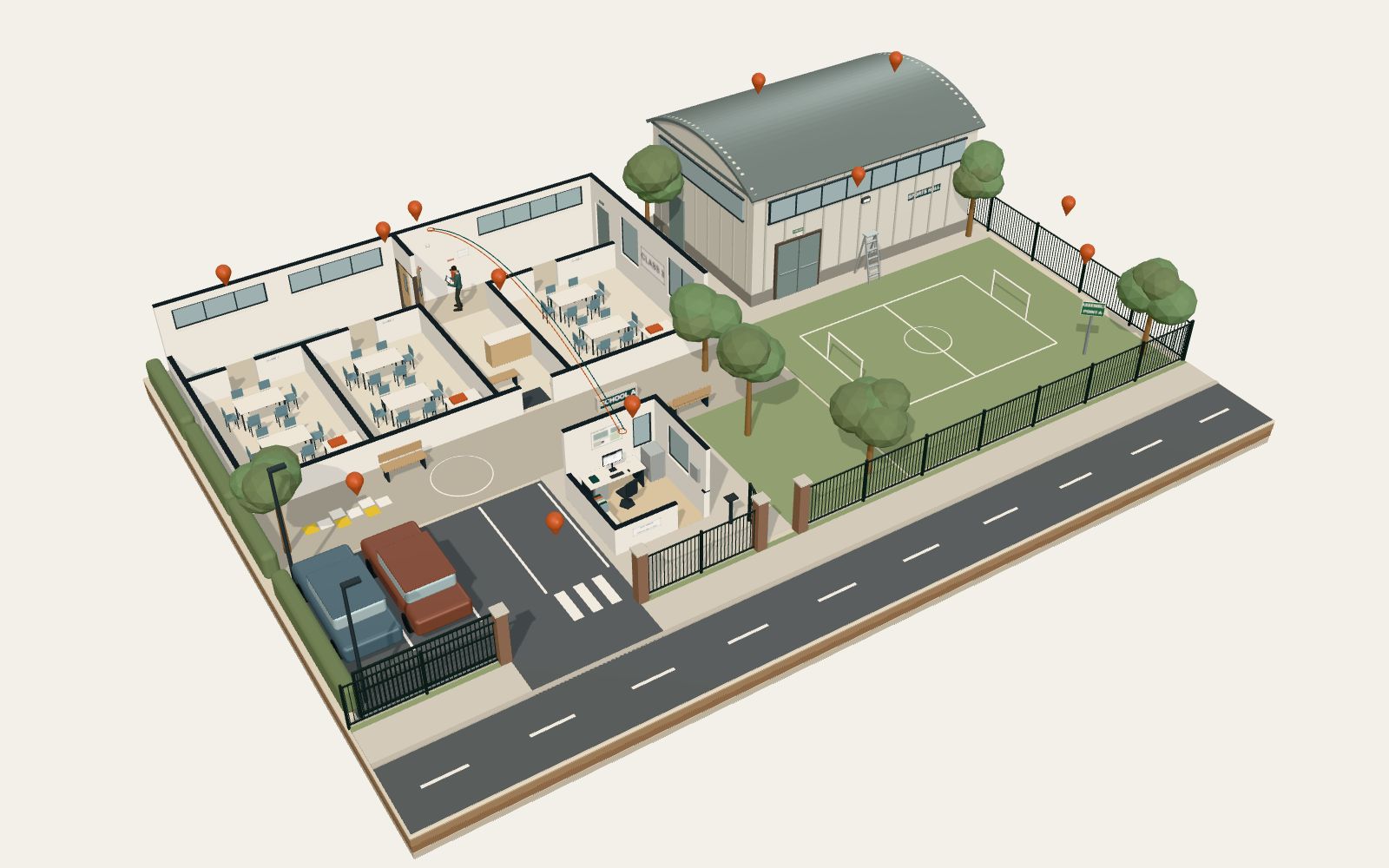
    A miniature school site from above: the main building, the sports hall, the field, the car park, the gates and the site office, with copper pins marking the day’s 12 checks.
    The day’s checks, each pinned to a place on the site plan.

    Early morning at School A. The site office screen shows the day’s list: 12 checks, from the weekly alarm test to the visitor log, each pinned to a place on the site plan.

    The list goes to the site manager’s tablet, and the round starts at 07:30.

    Everything in this walkthrough is illustrative. The school, people, places, times and dates are fictional.

    Show both screens

    Main buildingSite manager’s tablet

    Site checks

    Today’s checks

    School A · Main site

    Status: 0 of 12 done

    Mon 5 Oct · each check pinned to the site plan

    checks
    12
    done
    0
    open
    0
    to do
    12
    Buildings
    • Weekly alarm test · CP 3.2Zone 3
    • Fire doors closeCorridor B
    • Escape routes clearMain building
    • Emergency lightsSports hall
    • Extinguishers in placeSports hall
    • Lockdown drillWhole site · 10:30
    Site
    • Gates and fencesMain gate
    • Car park and crossingCar park
    • Assembly point clearField
    • Perimeter fenceField edge
    • Contractor permitSports hall
    • Visitor and contractor logSite office

    The day’s list on the tablet, with the round started.

    Site officeSite office screen

    Site records

    Today’s checks

    School A · Site office

    Status: 0 of 12 done

    checks
    12
    done
    0
    open
    0
    to do
    12
    Buildings
    • Weekly alarm test · CP 3.2Zone 3
    • Fire doors closeCorridor B
    • Escape routes clearMain building
    • Emergency lightsSports hall
    • Extinguishers in placeSports hall
    • Lockdown drillWhole site · 10:30
    Site
    • Gates and fencesMain gate
    • Car park and crossingCar park
    • Assembly point clearField
    • Perimeter fenceField edge
    • Contractor permitSports hall
    • Visitor and contractor logSite office

    Mon 5 Oct · list on the site manager’s tablet

    The same list on the site office screen.

  2. Chapter 02 of 06

    Weekly alarm test

    The corridor in the main building: the site manager with a tablet beside the red call point, with the fire door to one side and the sounder above.
    The test is recorded where it happens, with a photo, the time and initials.

    At 07:40 the site manager operates call point 3.2 in zone 3 for the weekly test. The sounders are heard and the panel is reset.

    The test is recorded on the tablet with a photo, the time and the site manager’s initials, and the record reaches the fire log in the site office.

    Show both screens

    Main buildingSite manager’s tablet

    Site checks

    Alarm test · CP 3.2

    School A · Main site

    Status: In the fire log

    Weekly test · Zone 3 · Corridor B

    Test
    Operated
    07:40
    Sounders
    Heard
    Panel
    Reset 07:41
    Photo
    • Call point 3.2Attached
    Record
    Time
    07:42
    Initials
    RB

    The alarm test, recorded and in the fire log.

    Site officeSite office screen

    Site records

    Today’s checks

    School A · Site office

    Status: 1 of 12 done

    checks
    12
    done
    1
    open
    0
    to do
    11
    Buildings
    • Weekly alarm test · CP 3.2Zone 3
    • Fire doors closeCorridor B
    • Escape routes clearMain building
    • Emergency lightsSports hall
    • Extinguishers in placeSports hall
    • Lockdown drillWhole site · 10:30
    Site
    • Gates and fencesMain gate
    • Car park and crossingCar park
    • Assembly point clearField
    • Perimeter fenceField edge
    • Contractor permitSports hall
    • Visitor and contractor logSite office

    Mon 5 Oct · list on the site manager’s tablet

    The site office screen with the test filed.

  3. Chapter 03 of 06

    A fire door that won’t close

    Fire door FD-07 standing ajar across the corridor, with a copper tag for job 2417, and the site manager holding the tablet.
    Photographed, flagged and sent to the contractor. Its status stays open.

    On the round, fire door FD-07 in corridor B does not close fully. The site manager photographs it and flags it.

    Job 2417 goes to the contractor with a fix date of Wed 7 Oct. Its status is open until the repair is recorded.

    By 08:20 the walk-round is done: seven more checks on record, each with a photo.

    Show the screen

    Main buildingSite manager’s tablet

    Site checks

    Today’s checks

    School A · Main site

    Status: 8 done · 1 open

    Mon 5 Oct · each check pinned to the site plan

    checks
    12
    done
    8
    open
    1
    to do
    3
    Buildings
    • Weekly alarm test · CP 3.2Zone 3
    • Fire doors closeCorridor B
    • Escape routes clearMain building
    • Emergency lightsSports hall
    • Extinguishers in placeSports hall
    • Lockdown drillWhole site · 10:30
    Site
    • Gates and fencesMain gate
    • Car park and crossingCar park
    • Assembly point clearField
    • Perimeter fenceField edge
    • Contractor permitSports hall
    • Visitor and contractor logSite office

    The day’s list after the walk-round: one item open.

  4. Chapter 04 of 06

    Lockdown drill

    The site manager’s tablet showing the procedures panel: evacuation, invacuation, lockdown and communication, with today’s lockdown drill logged from 10:30 to 10:41.
    The drill is logged with its times and lessons learned, next to the site’s procedures.

    At 10:30 the lockdown drill starts and the gates close. At 10:41 the drill ends and every area has reported in.

    The drill is logged with its start and end times and the lessons learned. The procedures panel shows evacuation, invacuation, lockdown and communication, each with when it was last practised.

    Show the screen

    Main buildingSite manager’s tablet

    Site checks

    Procedures

    School A · Main site

    Status: All four on record

    Each procedure with its last practice

    Procedures
    • EvacuationPractised 15 Sep
    • InvacuationPractised 29 Sep
    • LockdownPractised today 10:30
    • CommunicationMessage tested today
    Today’s drill
    Lockdown
    10:30–10:41
    Areas reported in
    All four
    Lessons learned
    1 · follow-up RB
    Log
    1. Site manager · RB Drill ended. Every area reported in.
    2. Site manager · RB Drill logged: start, end and lessons learned.
    3. System Drill filed with the site’s procedures.

    The drill logged, and the procedures panel.

  5. Chapter 05 of 06

    Contractor on site

    The gates and the site office: the contractor’s van in the car park, and the contractor in a hi-vis vest signing out at the lectern by the site office.
    Signed in, a permit issued, the work photographed and the permit closed.

    At 13:05 a contractor arrives at the site office and signs in. The site manager issues permit PTW-031 for the sports hall’s external light: work at height.

    When the work is finished, the permit closes with a photo of the work area. The contractor signs out at 15:40, and the visitor log is complete.

    Show the screen

    Main buildingSite manager’s tablet

    Site checks

    Permit PTW-031

    School A · Main site

    Status: Signed out 15:40

    Sports hall front · External light · work at height

    Permit
    Contractor
    JH · signed in 13:06
    Issued
    13:10 · RB
    Work area
    Sports hall front
    Closed
    15:30 · photo attached
    Signed out
    15:40
    Photo at close
    • Work area afterAttached
    Log
    1. Site manager · RB Permit PTW-031 issued: sports hall light.
    2. Contractor · JH Work finished. Permit closed with a photo.
    3. Contractor · JH Signed out at the site office.

    The permit, closed with a photo, and the sign-out.

  6. Chapter 06 of 06

    Ready at two days’ notice

    The site office screen showing the completeness view: one open item, fire door FD-07, with its fix date of Wed 7 Oct, and the pack ready to share.
    One pack from the records, and one open item with its fix date.

    The next morning an inspection notice arrives: the visit is on Thu 8 Oct, two days away.

    One selection builds the pack from the records, for the inspector, the governors, the insurer and the SIA. The completeness view shows 11 of the day’s 12 checks closed and one open item: fire door FD-07, with its fix booked for Wed 7 Oct.

    Show both screens

    Main buildingSite manager’s tablet

    Site checks

    Inspection pack

    School A · Main site

    Status: Pack built 09:12

    Notice received Tue 6 Oct 09:10 · visit Thu 8 Oct

    From the records
    • Fire alarm testsIncluded
    • Fire door checks1 open · fix Wed 7 Oct
    • Drills and proceduresIncluded
    • Contractor permitsIncluded
    • Daily checksIncluded
    Pack for
    Inspector
    Ready to share
    Governors
    Ready to share
    Insurer
    Ready to share
    SIA
    Ready to share

    Built from the records · one open item

    The pack, built from the records.

    Site officeSite office screen

    Site records

    Completeness

    School A · Site office

    Status: Pack built 09:12

    closed
    11
    open
    1
    audiences
    4
    Open
    • Fire door FD-07Fix Wed 7 Oct
    • Job 2417 · Corridor BContractor
    Complete
    • Fire alarm testsIncluded
    • Drills and proceduresIncluded
    • Contractor permitsIncluded
    • Daily checksIncluded
    Pack for
    Inspector
    Ready to share
    Governors
    Ready to share
    Insurer
    Ready to share
    SIA
    Ready to share

    Visit Thu 8 Oct · notice received Tue 6 Oct

    The completeness view, with the one open item.

Back to the 3D walkthrough

Next step

Which site records does your school keep on paper?

Bring one: the fire log, fire door checks, drill records, contractor permits or the pack you put together before an inspection. We will talk it through and suggest a sensible next step.