Examples · Walkthrough

One price list, everywhere it’s shown

Follow one practice group with three branches. The practice manager updates one standard price list, the owner approves it, and the website and every branch poster update together. A monthly check catches a stale poster, a complaint starts its clocks, and the dated proofs sit in one pack per remedy.

ExampleIllustrative workflow · fictional practice data

Illustrative only, with fictional data and prices. This shows record-keeping, not legal advice. Check the CMA’s guidance for your own deadlines.

Interactive walkthrough

How the walkthrough works

Six short chapters follow one practice group through a month. The CMA’s Order requires a standard price list, priced by pet weight band, one click from the homepage and shown in the practice, and a complaints process that acknowledges within 5 working days and responds within 8 weeks. For smaller businesses, the first deadlines fall around 23 March 2027.

Guided playback takes about a minute and a half. You can pause at any time, choose a chapter, or take each step yourself.

  1. One master price list
  2. Approved once
  3. Published everywhere at once
  4. The monthly drift check
  5. A complaint arrives
  6. Evidence, remedy by remedy

Prefer to read? The illustrated version tells the same story with stills and the interface details.

ExampleIllustrative workflow · fictional practice data

Illustrated version

The same month, in six chapters

Stills from the 3D scene, what happens in each chapter, and what the practice manager’s monitor or the reception tablet shows. It needs no graphics support and works without JavaScript.

ExampleIllustrative workflow · fictional practice data. Nothing here is a live system or a real practice.

  1. Chapter 01 of 06

    One master price list

    The back office: the practice manager at a desk with a monitor showing draft version 4 of the price list, and the owner standing beside the desk.
    One standard price list, by pet weight band, kept in one place.

    Thursday 25 February, in the back office of a practice group with three branches. The practice manager opens the master price list: version 3, with 48 standard prices, each set by pet weight band.

    Six prices change this month, in two services across three weight bands. The practice manager edits them in the one list and saves draft version 4. Nothing else is edited by hand: the website and the branch posters all come from this list.

    Everything in this walkthrough is illustrative. The practice group, people, prices, times and dates are fictional.

    Show the screen

    Back officePractice manager’s monitor

    Price list and records

    Draft version 4

    Practice group · Back office

    Status: With the owner

    Sent for approval · 09:42 · Owner · JH

    Draft version 4: six changes against version 3.

    prices
    48
    weight bands
    3
    changed
    6
    Changes against version 3
    • Neutering · up to 10 kg£265 → £275
    • Neutering · 10–25 kg£318 → £326
    • Neutering · over 25 kg£365 → £378
    • Dental clean · up to 10 kg£230 → £240
    • Dental clean · 10–25 kg£296 → £305
    • Dental clean · over 25 kg£340 → £352

    Draft version 4, with the six changes, sent to the owner.

  2. Chapter 02 of 06

    Approved once

    Close to the practice manager’s monitor: version 4 approved by the owner on Friday 26 February, with the six changed prices listed.
    The owner approves the list once, and it gets a version number and a date.

    On Friday 26 February the owner opens draft version 4 at the practice manager’s desk. The screen shows only what changed against version 3: six prices, each with its old and new value.

    The owner approves it at 11:20. The list is locked as version 4, dated, and set to take effect on Monday 1 March. Version 3 is kept, with its own dates.

    Show the screen

    Back officePractice manager’s monitor

    Price list and records

    Approve version 4

    Practice group · Back office

    Status: v4 · Fri 26 Feb

    Version
    Version
    4
    Prepared by
    Practice manager
    Approved
    Fri 26 Feb · 11:20 · JH
    Effective
    Mon 1 Mar
    Changes against version 3
    • Neutering · up to 10 kg£265 → £275
    • Neutering · 10–25 kg£318 → £326
    • Neutering · over 25 kg£365 → £378
    • Dental clean · up to 10 kg£230 → £240
    • Dental clean · 10–25 kg£296 → £305
    • Dental clean · over 25 kg£340 → £352

    Version 4 locked · version 3 kept with its dates

    Version 4, approved and dated.

  3. Chapter 03 of 06

    Published everywhere at once

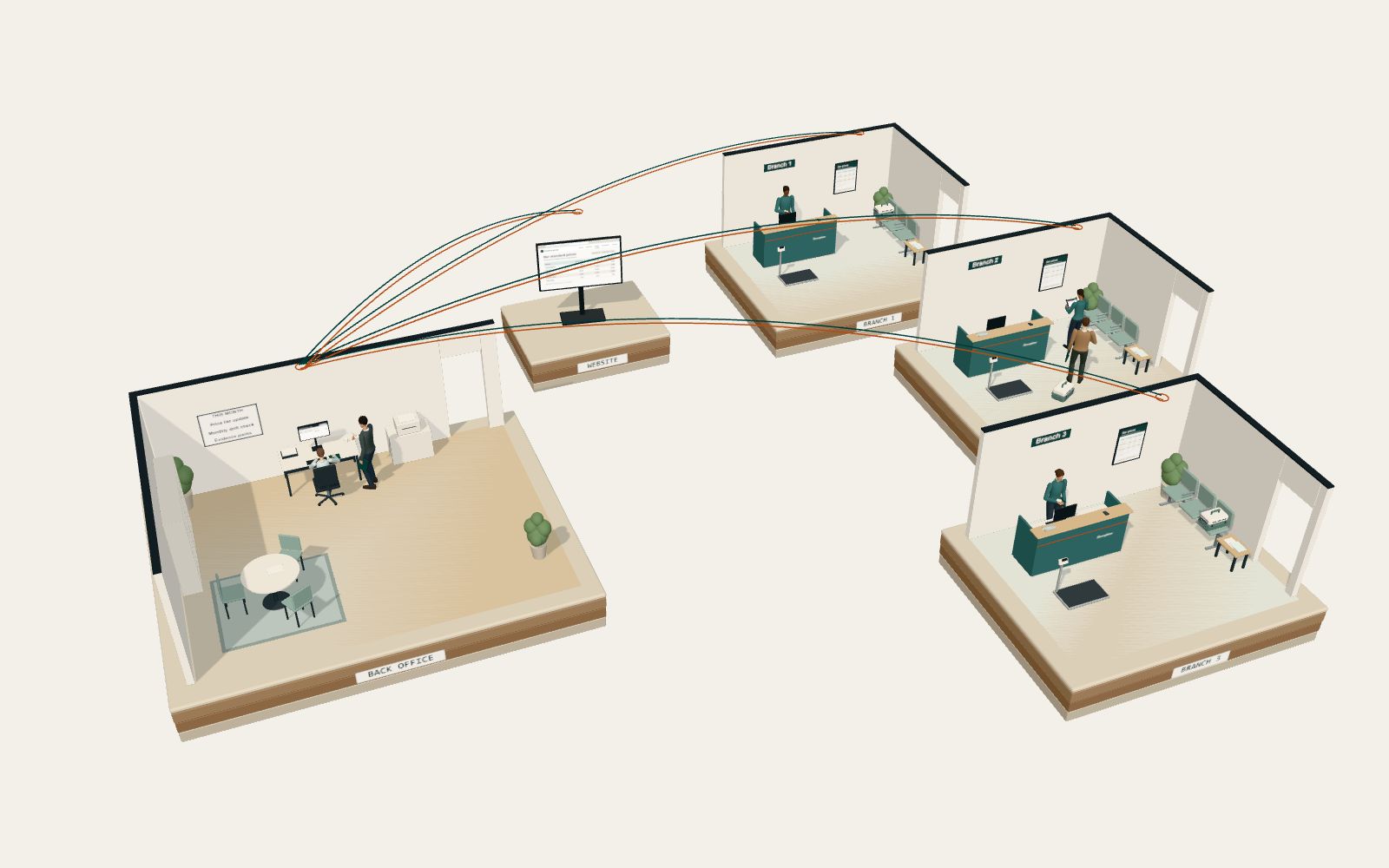
    The whole practice group from above, with the copper route line carrying version 4 from the back office to the website screen and to all three branches at once.
    The website page and every branch poster regenerate from the same approved list.

    At 08:00 on Monday 1 March the practice manager selects “Publish everywhere”. The website’s prices page, one click from the homepage, and the waiting-room poster for each branch regenerate from version 4 at the same moment.

    Each place gets a dated proof of publication: a capture of the website page, and a dated poster file issued to each of Branches 1, 2 and 3.

    Show the screen

    Back officePractice manager’s monitor

    Price list and records

    Publish version 4

    Practice group · Back office

    Status: Published Mon 1 Mar

    Proof of publication
    • Website · prices pageCaptured 08:00
    • Branch 1 · posterIssued 08:00
    • Branch 2 · posterIssued 08:00
    • Branch 3 · posterIssued 08:00
    Version 4
    Approved
    Fri 26 Feb · 11:20 · JH
    Effective
    Mon 1 Mar
    Homepage to prices
    One click
    Log
    1. Practice manager Version 4 published to the website and Branches 1 to 3.
    2. System Website page captured. Three posters regenerated and issued. Each proof dated.

    The dated proof of publication for each place.

  4. Chapter 04 of 06

    The monthly drift check

    Branch 2’s waiting room: the receptionist holds a tablet in front of the new version 4 price poster, beside the reception desk.
    Once a month, the master list is checked against everywhere it’s shown.

    On Monday 15 March the monthly check compares the master list with the practice system’s export. All 48 prices match.

    Each branch’s poster is checked too. Branch 2’s poster still shows version 3, with last month’s prices: the new poster was issued but never put up. The check flags it.

    Branch 2 prints the version 4 poster, puts it up and adds a dated photo. The check closes at 10:31 with all four places showing version 4.

    Show the screen

    Branch 2Reception tablet

    Reception

    Poster check

    Branch 2

    Status: Matches v4

    Photo added · 10:30 · SK

    Version 4 poster up in the waiting room.

    Waiting-room poster
    On the wall
    v4 · from 1 Mar
    Current list
    v4 · from 1 Mar
    Proof
    • Poster in placeAttached

    Check closed 10:31

    Branch 2’s poster check, with the dated photo.

  5. Chapter 05 of 06

    A complaint arrives

    The Branch 2 reception tablet showing complaint C-031 with its two clocks: acknowledge by Tuesday 23 March and respond by Tuesday 11 May.
    The complaint is logged, and two clocks start.

    At 14:10 on Tuesday 16 March a client at Branch 2 makes a complaint about a bill. The receptionist logs it on the tablet as complaint C-031.

    Two clocks start from the day it arrived: acknowledge within 5 working days, by Tuesday 23 March, and respond within 8 weeks, by Tuesday 11 May. The practice manager acknowledges it in writing the next working day.

    Show the screen

    Branch 2Reception tablet

    Reception

    Complaint C-031

    Branch 2

    Status: Acknowledged

    About a bill · made in person at Branch 2

    Clocks
    • Acknowledge by Tue 23 MarDone
    • Respond by Tue 11 May8 weeks
    Record
    Received
    Tue 16 Mar · 14:10
    Logged by
    Reception · SK
    Log
    1. Reception · SK Complaint C-031 logged. Acknowledge by Tue 23 Mar. Respond by Tue 11 May.
    2. Practice manager Complaint C-031 acknowledged in writing.

    The complaint and its two clocks.

  6. Chapter 06 of 06

    Evidence, remedy by remedy

    A wide view from the other side: the back office, the website screen and the three branch waiting rooms, linked by the route lines that carried each version and each proof.
    One pack per remedy, each holding its dated proofs.

    On Wednesday 31 March the practice manager updates the evidence packs, one for each remedy: the approved price list with its versions, the dated website captures, the poster photos from each branch, and the complaint log with its clocks.

    The complaint log is ready to share with the regulator on request.

    Show the screen

    Back officePractice manager’s monitor

    Price list and records

    Evidence packs

    Practice group · Back office

    Status: Packs updated

    One pack per remedy, each holding its dated proofs.

    Packs
    • Standard price listv3, v4 · approvals
    • One click from the homepage2 page captures
    • Shown in the practice7 poster photos
    • Complaints processLog · C-031
    Complaint log
    Complaints this month
    1
    C-031 acknowledged
    Wed 17 Mar
    C-031 respond by
    Tue 11 May

    Complaint log ready to share with the regulator on request

    The evidence packs, one per remedy.

Back to the 3D walkthrough

Next step

Where does your price list live today?

Bring one list: the price list, the posters, the website page or the complaint log. We will talk it through and suggest a sensible next step.